Using glidingschool.com with Condor 3
The lessons available from this site can be used online, or in Condor 2’s Flight School (see below). It is not yet possible to load these lessons in Condor 3’s Flight School.
The best way to use these lessons with Condor 3 is to view them online.
The briefing text is the same for both.
The videos within the online lessons are in place of the demonstrations available within the Condor Flight School. The advantages to viewing them online:
- greater control over their flow (pause, rewind, fast forward)
- most online videos offer commentary and enhanced graphics for clearer explanations, which is just not possible within Condor’s Flight School
- available wherever and whenever you have access to the internet, as they are independent of the Condor software.
Practise the flying skill in Condor. Condor 2 and Condor 3 can be installed on the same PC. If you do not have access to Condor 2, fly the exercises in Condor 3, in conditions to suit the exercise. I am planning to provide suitable Flight Plans to enable this more easily in future.
Lessons for Condor 2’s Flight School
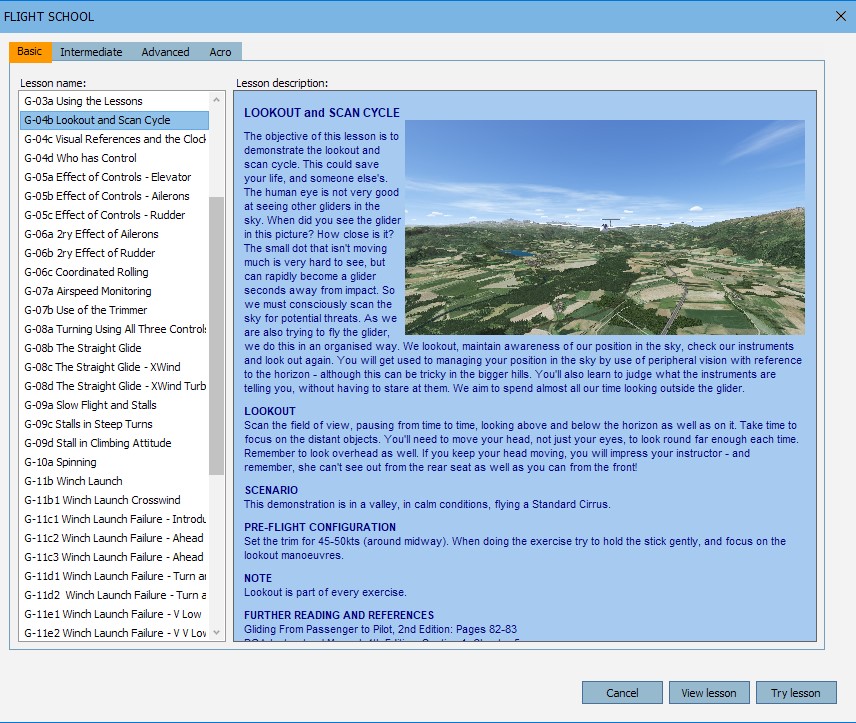
All the lessons are published as a single download file for implementation in Condor 2.
Each lesson includes
- Replay (rpy filetype). This is the demonstration of the flight exercise as a Condor 2 replay, for implementation in Flight School. Accessed via View Lesson button in Flight School.
- Briefing (htm filetype). The briefing, viewed in Flight School. The briefings cover:
- Introduction
- Learning Points
- Scenario for the Demonstration, describing what it covers
- Pre-Flight Configuration
- Performing the Exercise
- Notes
- Further Reading
- Condor Setup for the exercise
- Images (jpg filetype). One or more images to illustrate the lesson.
- Demonstration Messages (txt filetypes). Displayed on screen during the replay. Two versions are available: Fully Scripted and Titles Only.
The How To Install Flight School Lessons Guide is included. It describes the simple process for adding the lessons to Condor Flight School.
Request a Download Link
The most recent release for Condor Flight School is dated 10 January 2023. The website was last updated on 12 January 2023. Development is ongoing, to be more informative, update links, references, forums, and to make better use of images in Flight School, so check back here for news of the latest releases.
The lesson bundle is currently distributed via a download link, requested by email. Complete this form and click the Request button.
Lessons are available in English and Spanish language versions. The English language version will be provided by default. Please state if you would prefer the Spanish version.
When completing the request, we’d really appreciate knowing a little about you, your flying and gliding experience, and how you intend to use these lessons. The link will be sent to the email address supplied – please allow some time, especially on a gliding day. Thank you.


User Guides
Other Documents
Your contributions
The site will be extended as lessons and documents become available. Your contributions are welcome for all topics.
As glidingschool.com takes off, it will become a resource for all potential glider pilots and instructors. You can help to make this happen.
Contact glidingschool.com to contribute your lessons or just to discuss ideas.
Basis of Supply
These lessons are provided free of charge, without warranty, for use by individuals and gliding clubs on a non-commercial basis.
Updates
The GlidingSchool.com lessons were developed for Condor2. They will be updated from time to time. Visit the Downloads page for news of updates, and to request the latest version.
Comments and Feedback
Your comments and feedback would be welcome. Visit the Contact page to send your thoughts.
Forums
Join us on the Forums provided by Condor Soaring and GliderPilot.net (the URAS forum).
 glidingschool.com